- Home Page /
- Electronics /
- Computer Accessories /
- Computer Accessories & Peripherals /
- Input Devices /
- Touch Pads /
- ProtoArc T1 Plus Bluetooth Trackpad for Win 1...
0 ratings



Item #:
230292147
ProtoArc T1 Plus Bluetooth Trackpad for Win 11/10, Grey Black
86% of respondents would recommend this to a friend
 1 Sustainability Highlights
Item #:
230292147
SGD 93
Price Details
Excluding Shipping & Custom charges ( Shipping and custom charges will be calculated on checkout )
*All items will import from US
27%
In stock
 Imported from USA store
QTY:
Order now and get it around Saturday, September 12
Secured transaction
Ubuy works hard to protect your security and privacy. Our advanced payment security system ensures confidentiality by encrypting your information during transmission using AES (Advanced Encryption Standards) and SSL (Secure Socket Layer) protocols. Your payment details are 100% secure as we do not share your payment details with third party sellers.
Our Top Logistics Partners


Connect up to 3 devices simultaneously and switch effortlessly with the T1 Plus Trackpad for seamless productivity!

Fast
Shipping

Free
Return*

Secure Packaging

100% Original Products

PCI DSS Compliance

ISO 27001 Certified



Note: Step Down Voltage Transformer required for using electronics products of US store (110-120). Recommended power converters Buy Now.


What Stands Out
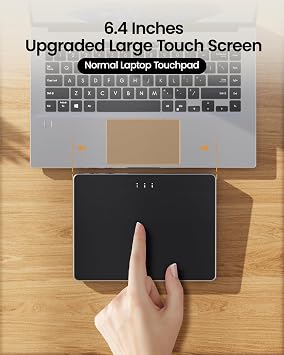
Large Touch Surface
Offers an expansive touch surface that enhances gesture controls, making navigation smoother and more intuitive for users on both desktop and laptop devices.
High-Precision Tracking
Features advanced sensor technology that ensures high-precision tracking, providing an effortless and accurate user experience, minimizing latency for seamless operation.
Multi-Gesture Support
Supports a wide range of multi-touch gestures, allowing quick access to features and enhanced productivity for Windows 10 and 11 users, streamlining workflows.
Product Details
| Connectivity Technology | Bluetooth |
| Additional Features | Bluetooth Connection Only, Type‑C Fast Charging, Windows 10/11 Only |
| Compatible Devices | Laptop, Personal Computer, Tablet |
| Operating System | Windows 11 |
| Battery Average Life | 50 hours |
| Power Source | Battery Powered |
| Minimum Required Operating System Version | Windows 10 |
| Color | Grey Black |
| Brand | ProtoArc |
| Included Components | 1*Bluetooth Trackpad for Windows 10/11, 1*Charging Cable, 1*Manual |
| Manufacturer | ProtoArc |
| Item Dimensions L x W | 6.4"L x 6.4"W (16.3 cm) |
| Unit Count | 1 Count |
| Special Feature | Bluetooth Connection Only, Type‑C Fast Charging, Windows 10/11 Only |
What's in the box
1*Bluetooth Trackpad for Windows 10/11
1*Charging Cable
1*Manual
Who Should Buy?

-
Creative Professionals
Ideal for graphic designers and artists who benefit from multi-gesture controls for precision work.
-
Minimalist Setup
Perfect for users seeking a clean, keyboard-centric workspace without clutter from traditional mice.
-
Frequent Travelers
Compact and wireless design makes it suitable for those who work on-the-go with laptops.

-
Gaming Enthusiasts
Not suitable for high-speed, competitive gaming requiring quick, precise mouse movements.
Product Description
Sustainability Highlights
This product has sustainability features recognized by trusted certifications.
Carbon impact
Carbon emissions from the lifecycle of this product were measured, reduced and/or offset. As certified by
The ClimatePartner certified product label confirms that a product meets the requirements for the five steps in climate action including calculating carbon footprints, setting reduction targets, implementing reductions, financing climate projects and communicating transparently to continuously reducing emissions. Learn more about this certification
- Certification Number
- IUP9HP
Have any Query? Chat with us
Customer Questions & Answers
-
Question:
What devices are compatible with the ProtoArc T1 Plus Bluetooth Trackpad?
Answer: The ProtoArc T1 Plus Bluetooth Trackpad is primarily designed for Windows 10 and 11 users, making it compatible with many laptops and desktop PCs running these operating systems. It connects via Bluetooth, ensuring seamless operation without additional software. This trackpad is particularly useful for those who prefer a more ergonomic input method than traditional mice or touchpads, enhancing user experience during tasks like graphic design, video editing, or simple web browsing. -
Question:
How does the ProtoArc T1 Plus Bluetooth Trackpad enhance productivity?
Answer: The ProtoArc T1 Plus Bluetooth Trackpad provides a touch-sensitive surface that supports multi-touch gestures, allowing for gestures like pinch-to-zoom and swipe. This feature can significantly boost productivity, especially for creative professionals and power users who rely on efficiency in their workflows. Users can navigate and interact with applications more fluidly, making it ideal for tasks like photo editing or presentation creation where quick gestures can save time and effort. -
Question:
Is the ProtoArc T1 Plus Bluetooth Trackpad user-friendly for beginners?
Answer: Yes, the ProtoArc T1 Plus Bluetooth Trackpad is designed with usability in mind, making it beginner-friendly. Its plug-and-play capability allows new users to get started without complex setup processes. Furthermore, intuitive gestures can quickly be learned, offering a smooth transition for those switching from a mouse or traditional touchpad. This makes it an excellent choice for students or anyone new to using advanced input devices. -
Question:
Can I use the ProtoArc T1 Plus Bluetooth Trackpad for gaming?
Answer: While the ProtoArc T1 Plus Bluetooth Trackpad is primarily intended for productivity, it can be used for casual gaming. The touchpad supports various gestures, but it may not replace a dedicated gaming mouse for fast-paced or competitive games. However, for indie games or strategy games where precision and movement aren’t as critical, it can serve as a convenient alternative for gamers who prefer a minimalistic setup. -
Question:
How do I connect the ProtoArc T1 Plus Bluetooth Trackpad to my computer?
Answer: Connecting the ProtoArc T1 Plus Bluetooth Trackpad to your computer is straightforward. Ensure the trackpad is charged and in pairing mode, then navigate to the Bluetooth settings on your Windows 10 or 11 device. Select the trackpad from the list of available devices, and once paired, it will automatically connect in the future. This wireless connection offers flexibility and declutters your workspace, ideal for any user seeking a minimalistic setup. -
Question:
What gestures are supported by the ProtoArc T1 Plus Bluetooth Trackpad?
Answer: The ProtoArc T1 Plus Bluetooth Trackpad supports a variety of multi-touch gestures that enhance navigation. Users can easily perform actions like scrolling, pinch-to-zoom, and three-finger swipe for task management. These gestures make browsing and multitasking easier, especially when you need to switch between applications quickly or manipulate documents. This feature is particularly beneficial for professionals in design or content creation who rely on efficient navigation. -
Question:
How does the ProtoArc T1 Plus Bluetooth Trackpad differ from other trackpads?
Answer: The ProtoArc T1 Plus Bluetooth Trackpad stands out due to its combination of portability, Bluetooth connectivity, and user-friendly multi-touch features. Unlike some traditional wired trackpads, this device offers the freedom of a wireless connection, allowing you to use it from a distance. Furthermore, its sleek design in Grey Black adds a modern touch to any workspace, appealing to both casual users and professionals looking for aesthetics alongside functionality. -
Question:
Can I customize the gestures on the ProtoArc T1 Plus Bluetooth Trackpad?
Answer: Yes, the ProtoArc T1 Plus Bluetooth Trackpad allows for some level of gesture customization through your computer's settings. Users can often assign specific functions to different gestures, enhancing their workflow based on personal preference. This feature is particularly valuable for advanced users who want to tailor their input methods for specific tasks or software applications, ultimately improving their efficiency and comfort while working. -
Question:
What is the battery life of the ProtoArc T1 Plus Bluetooth Trackpad?
Answer: The ProtoArc T1 Plus Bluetooth Trackpad is designed for longer usage with efficient battery consumption. Users can typically expect extended use on a single charge, allowing for uninterrupted productivity sessions. This is especially advantageous for professionals who may require a reliable input device during all-day projects or presentations, as it reduces the concern of frequent recharging, ensuring the trackpad is always ready for use. -
Question:
Where can I buy the ProtoArc T1 Plus Bluetooth Trackpad For Win 11/10, Grey Black?
Answer: You can purchase the ProtoArc T1 Plus Bluetooth Trackpad for Windows 11/10 in Singapore from Ubuy. They offer a wide selection of tech products, ensuring convenience and fast access to various gadgets, including the ProtoArc trackpad. Simply visit their website, search for the product, and explore the purchasing options available.
ProtoArc Touch Pads Editorial Review


ProtoArc T1 Plus Bluetooth Trackpad for Win 11/10, Grey Black | Large 6.4" touch surface, supports 3-device switching via Bluetooth. No USB receiver needed. Rechargeable and Multi-Gesture. The ProtoArc T1 Plus Bluetooth Trackpad offers a seamless navigation experience with its large 6.4-inch touch surface and the ability to connect to three devices via Bluetooth, ensuring you can easily switch between your laptop, tablet, or PC without interruption. Users appreciate its responsive touch, making it easy to glide through tasks, especially in a multitasking environment. The rechargeable battery life is impressive, averaging around 50 hours, making it low maintenance. However, some feedback indicates that the tapping function can be a bit picky, requiring more precise tapping to register correctly. Overall, it is highly praised for its sleek design and functionality that enhances productivity for Windows users.
Customer Reviews & Ratings
36 customers ratings
-
5 Star
67%
-
4 Star
16%
-
3 Star
11%
-
2 Star
0%
-
1 Star
6%
Review this product
Share your thoughts with other customers
Pros
- Large touch surface enhances navigation convenience
- Connects to three Bluetooth devices easily
- Rechargeable with long battery life
- Sleek design with premium quality feel
- Smooth surface for easy cursor movement
Cons
- Could benefit from a USB connection option for non-Bluetooth devices
Platform Trust & Buyer Confidence

JG
Jazz
Verified buyer
“Easy to use and always helpful and sorts any issues I've had past and present”
1 September 2026 · via Trustpilot
EK
Emmanuel
Verified buyer
“I always receive support when I engage customer service. Overall my experience with UBUY has been top notch. Keep up the good work.”
31 August 2026 · via Trustpilot
F
fnd
Verified buyer
“The delivery was fast and the product came undamaged and authentic.”
29 August 2026 · via Trustpilot
LC
Leana
Verified buyer
“Ubuy is extremely efficient and to order online is an easy process. The verity of products to buy is really unlimited! My order was urgent and I got it on time. The products are great! Thank you Ubuy!”
25 August 2026 · via Trustpilot
HL
Hengo
Verified buyer
“Fast, convenient and cheap. Great store!”
27 August 2026 · via Trustpilot
Secure Checkout
Global Delivery
Easy Returns
Genuine Products
Product Price History
Important information
- Limitations : For products shipped internationally, please note that any manufacturer warranty may not be valid; manufacturer service options may not be available; product manuals, instructions, and safety warnings may not be in destination country languages; the products (and accompanying materials) may not be designed in accordance with destination country standards, specifications, and labeling requirements; and the products may not conform to destination country voltage and other electrical standards (requiring use of an adapter or converter if appropriate). The recipient is responsible for assuring that the product can be lawfully imported to the destination country. When ordering from Ubuy or its affiliates, the recipient is the importer of record and must comply with all laws and regulations of the destination country.
- Not all the products listed on Ubuy are for sale, as Ubuy is a global search engine. Products are subject to export/trade regulations.
SGD 93
Order now and get it around Saturday, September 12
This item is not restrict in my country.(Please click on above link if this item is not restrict in your country, So our team will review and allow.)
QTY:
Secured transaction
PCI DSS compliant and ISO 27001:2022 certified, with encrypted payments and full buyer protection on every order.
Our Top Logistics Partners
Fastest cross-border delivery
Features & Benefits
- Compatible with Windows 10/11 only, ensuring optimal performance.
- Connects via Bluetooth and supports up to 3 devices simultaneously.
- Large 6.4-inch touchscreen for a comfortable user experience.
- Built-in rechargeable battery lasts up to 50 hours on a full charge.
- Convenient left and right physical clicks for enhanced usability.
- Designed exclusively for Windows, avoiding compatibility issues with other operating systems.
Ubuy Assurance
Experience worry-free shopping with 100% original products, PCI DSS-compliant payment security, ISO 27001-certified data protection, the fastest cross-border delivery, free returns *, and secure packaging on every order.