- Home Page /
- Mobile Phone Accessories /
- Accessories /
- Chargers & Power Adapters /
- Power On Off Button + Volume Button Side Button Replace...
0 ratings

Item #:
229058538
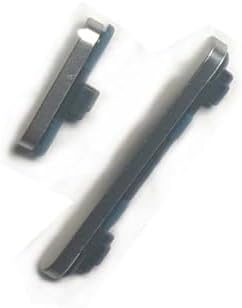
Power On Off Button + Volume Button Side Button Replacement Repair Part for Google Pixel 8A (Gold)
Item #:
229058538
SGD 36
Price Details
Excluding Shipping & Custom charges ( Shipping and custom charges will be calculated on checkout )
*All items will import from US
In stock
 Imported from USA store
QTY:
Only 2 items left in stock.
Order now and get it around Monday, June 29
Secured transaction
Ubuy works hard to protect your security and privacy. Our advanced payment security system ensures confidentiality by encrypting your information during transmission using AES (Advanced Encryption Standards) and SSL (Secure Socket Layer) protocols. Your payment details are 100% secure as we do not share your payment details with third party sellers.
Our Top Logistics Partners


Special skill and techniques required for proper installation.

Fast
Shipping

Free
Return*

Secure Packaging

100% Original Products

PCI DSS Compliance

ISO 27001 Certified


Note: Step Down Voltage Transformer required for using electronics products of US store (110-120). Recommended power converters Buy Now.


Product Details
- This product are tested before shipping
- for Google Pixel 8A
- Disassembly instruction isn't include, you may can search it via Internet.
- Special skill and techniques required for proper installation,Please check both the model and picture before purchase.
- Packing : 1 set
| Package Dimensions | 3 x 2 x 0.1 inches (7.6 x 5.1 x 0.3 cm) |
| Item Weight | 0.176 ounces (4.99 grams) |
| Other display features | Wireless |
| Color | Gold |
| Whats in the box | Tools and instructions not included. |
| Manufacturer | XINJUNKENG |
| Date First Available | April 7, 2024 |
What's in the box
Tools and instructions not included.
Product Description
Have any Query? Chat with us
Customer Questions & Answers
-
Question:
What is the purpose of the Power On Off Button for Google Pixel 8A?
Answer: The Power On Off Button for the Google Pixel 8A allows users to turn their device on and off, enabling efficient power management. Over time, regular use can lead to wear and tear, causing it to malfunction. Replacing a faulty button can restore functionality and ensure that your phone operates as intended, allowing you to quickly access your device or conserve battery life when not in use. -
Question:
How do I know if I need a replacement Volume Button?
Answer: Indicators for needing a replacement Volume Button include difficulty in adjusting sound levels, the button being stuck, or it not responding at all. These issues can hinder your ability to control volume while listening to music or during calls. A timely replacement will not only restore audio control but also enhance your overall experience with your Google Pixel 8A. -
Question:
Can I replace the Side Button myself?
Answer: Yes, you can replace the Side Button yourself if you have the right tools and a bit of technical know-how. Typically, a small screwdriver and a plastic opening tool are sufficient. Carefully open your device, detach the old button, and insert the new one. If you're confident in your abilities, this DIY approach can save you time and ensure your phone gets back to full functionality promptly. -
Question:
What tools do I need for the replacement process?
Answer: To replace the Power On Off Button, Volume Button, or Side Button on your Google Pixel 8A, you'll need a precision screwdriver set, a plastic opening tool, and possibly tweezers. These tools help avoid damage to your device while ensuring you can access the internal components safely. Having the right tools makes the replacement process smoother and more effective. -
Question:
Are there precautions I should take when replacing buttons?
Answer: Yes, take several precautions to protect your Google Pixel 8A during replacement. Always power off your device before starting, work on a static-free surface, and avoid applying excessive force while detaching or reattaching components. Additionally, it might be helpful to watch tutorial videos beforehand, ensuring you understand the replacement process, which can minimize the risk of damaging your device. -
Question:
What should I do if the new button doesn't work?
Answer: If the new button doesn’t function after replacement, first ensure that it is properly seated and connected. Sometimes, a misalignment can cause it to fail. If problems persist, double-check for any damage to the internal connectors, as well as consider re-evaluating the installation steps. Inadequate contact may lead to a malfunctioning button, and redoing the process with careful attention can remedy the issue. -
Question:
Does the button replacement affect my phone's warranty?
Answer: Replacing specific components like the Power On Off Button or Volume Button may void the warranty, particularly if not performed correctly. If your Google Pixel 8A is still under warranty, it's advised to check your warranty terms or consult with the manufacturer before proceeding with DIY repairs, as improper installation could lead to complications down the line. -
Question:
Where can I buy the Power On Off Button Replacement for Google Pixel 8A?
Answer: You can purchase the Power On Off Button, Volume Button, and Side Button Replacement Repair Parts for the Google Pixel 8A Gold at Ubuy. Ubuy offers a reliable shopping experience with a vast selection of phone parts, making it a convenient choice for securing the parts you need to restore your device's functionality. -
Question:
How do I test the new buttons after installation?
Answer: After installing the new buttons on your Google Pixel 8A, power on the device and methodically test each button. Test the Power On Off Button by turning the device on and off, check the Volume Button by adjusting sound levels during playback, and press the Side Button to ensure it responds. This step ensures that the replacement was successful and that all buttons are functioning as expected. -
Question:
Is it safe to use third-party replacement buttons?
Answer: While many third-party replacement buttons may be functional, ensure that they are compatible with your Google Pixel 8A and sourced from reputable sellers. High-quality third-party parts can perform just as well as original equipment. However, cheaper options might compromise performance, so always read reviews and verify the manufacturer before proceeding with a purchase.
XINJUNKENG Chargers & Power Adapters Editorial Review
No editorial reviews found
Customer Reviews & Ratings
1 customers ratings
-
5 Star
0%
-
4 Star
100%
-
3 Star
0%
-
2 Star
0%
-
1 Star
0%
Review this product
Share your thoughts with other customers
Product Price History
Important information
- Limitations : For products shipped internationally, please note that any manufacturer warranty may not be valid; manufacturer service options may not be available; product manuals, instructions, and safety warnings may not be in destination country languages; the products (and accompanying materials) may not be designed in accordance with destination country standards, specifications, and labeling requirements; and the products may not conform to destination country voltage and other electrical standards (requiring use of an adapter or converter if appropriate). The recipient is responsible for assuring that the product can be lawfully imported to the destination country. When ordering from Ubuy or its affiliates, the recipient is the importer of record and must comply with all laws and regulations of the destination country.
- Not all the products listed on Ubuy are for sale, as Ubuy is a global search engine. Products are subject to export/trade regulations.
SGD 36
Order now and get it around Monday, June 29
This item is not restrict in my country.(Please click on above link if this item is not restrict in your country, So our team will review and allow.)
QTY:
Only 2 items left in stock.
Secured transaction
Ubuy works hard to protect your security and privacy. Our advanced payment security system ensures confidentiality by encrypting your information during transmission using AES (Advanced Encryption Standards) and SSL (Secure Socket Layer) protocols. Your payment details are 100% secure as we do not share your payment details with third party sellers.
Our Top Logistics Partners
Fastest cross-border delivery
Features & Benefits
- Product tested before shipping for quality assurance.
- Compatible specifically with Google Pixel 8A.
- No disassembly instruction included but can be found online.
- Ensure correct model and picture match before purchasing.
- Includes 1 complete set in the packaging.
- Perfect choice for DIY enthusiasts.