- Home Page /
- Electronics /
- Computer Accessories /
- Computer Accessories & Peripherals /
- Input Devices /
- Digital Pens /
- Metapen Stylus Pen M3 Pro - 4096 Pressure Lev...
0 ratings






Item #:
220364800
Metapen Stylus Pen M3 Pro - 4096 Pressure Levels, 360 Touch Button - Surface Pro 7/8/9/X, Go 3/Book 3/Laptop 4/Studio 2, ASUS VivoBook Flip 14 - for
Item #:
220364800
SGD 71
Price Details
Excluding Shipping & Custom charges ( Shipping and custom charges will be calculated on checkout )
*All items will import from US
In stock
 Imported from USA store
QTY:
Order now and get it around Thursday, July 30
Secured transaction
Ubuy works hard to protect your security and privacy. Our advanced payment security system ensures confidentiality by encrypting your information during transmission using AES (Advanced Encryption Standards) and SSL (Secure Socket Layer) protocols. Your payment details are 100% secure as we do not share your payment details with third party sellers.
Our Top Logistics Partners


With 4096 levels of pressure sensitivity, the Metapen Stylus M2 is ideal for artists, photographers, and designers.

Fast
Shipping

Free
Return*

Secure Packaging

100% Original Products

PCI DSS Compliance

ISO 27001 Certified


Note: Step Down Voltage Transformer required for using electronics products of US store (110-120). Recommended power converters Buy Now.


What Stands Out
Precision Control
With 4096 levels of pressure sensitivity, the Metapen Stylus Pen M2 offers unparalleled precision for detailed work, making it ideal for artists, students, and professionals who demand accuracy.
Eraser End
The built-in eraser end provides a seamless user experience, enhancing creativity by allowing users to easily correct mistakes without switching tools, streamlining workflows for effective creation.
Wide Compatibility
Compatible with multiple Surface devices and ASUS VivoBook Flip 14, the Metapen Stylus Pen M2 caters to a diverse audience, ensuring that it meets the needs of creators, students, and doers alike.
Product Details
- 【High-Performance MPP Technology】The Metapen M3 Pro Surface Pen features advanced MPP technology, comparable to the Microsoft Surface Pen. With innovative strain gauge technology and a newly optimized structural design, it ensures a stable pen tip for smooth and uninterrupted writing. Metapen is the third company in the world to possess this strain gauge technology, following two large publicly listed global companies
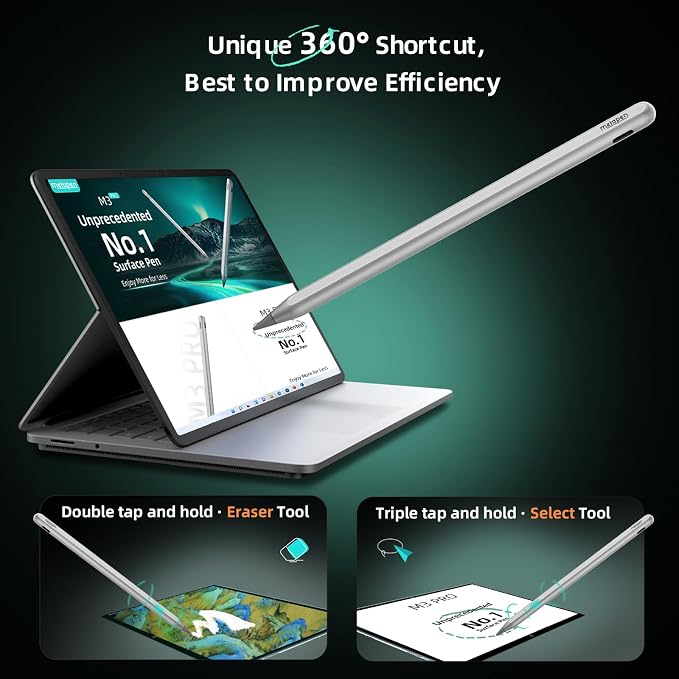
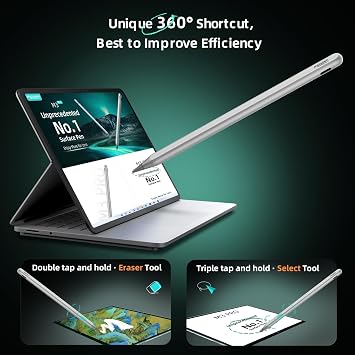
- 【360° Invisible Button】Equipped with a 360° invisible button, the pen allows seamless transitions between writing and erasing. Double-click and hold to switch to the eraser, and triple-click and hold to switch to the selection tool. Enjoy enhanced convenience and efficiency in your creative process
- 【Enhanced Writing Experience】 Experience a paper-like feel with optimized pen damping and reduced tapping noise. Excellent writing experience and extremely high accuracy provide a more comfortable writing and drawing experience. The Metapen M3 Pro supports the MPP 2.0 protocol and 4096 levels of pressure sensitivity, making it ideal for artists, engineers, and anyone who requires precise and detailed work. Capture your ideas and creative thoughts as they happen, bringing them to life effortlessly
- 【Tilt Function and Palm Rejection】 The M3 Pro accurately reproduces both fine lines and broad brush strokes. Tilt the tip up to ±55° to create artistic shading in your drawings. Advanced palm-rejection technology prevents accidental touches, providing a comfortable and uninterrupted writing experience. No Bluetooth connection is required; simply press the top button to turn on. The pen will turn off automatically after a long press of 2 seconds on the top button or after 5 minutes of inactivity
- 【Wide Compatibility with Windows Devices】Contact us at [email protected] with your device model if you are unsure about compatibility. The M3 Pro is compatible with most Microsoft Surface devices and some models from HP, ASUS, DELL, Acer, SONY, and ViewSonic. [Surface Model List] ✔Surface Pro 3/Pro 4/Pro(5th Gen)/Pro 6/Pro 7/Pro 7+/Pro 8/Pro X, ✔Surface Book/Bk 2/Bk 3, ✔Surface Laptop/Laptop 2/Laptop 3/Laptop 4/Laptop Studio, ✔Surface 3, ✔Surface Go/Go 2/Go 3, ✔Surface Studio/Studio 2. Before purchase, please confirm your laptop is compatible with the pencil
| Number of Batteries | 1 CR5 batteries required. (included) |
| Compatible Devices | Laptops, Tablets |
| Minimum Required Operating System Version | Windows 10 |
| Compatible Tablet Computer Models | HP 7 Plus, HP Pro 8, Microsoft Surface 3, Microsoft Surface Go, Microsoft Surface Go 3, Microsoft Surface Pro 3, Microsoft Surface Pro 7, Sony Tablet S |
| Item Weight | 14 Grams |
| Color | Silver |
| Enclosure Material | Plastic, Rubber |
| Brand | metapen |
| Model Number | MPP662 |
| Are Batteries Included | Yes |
| Are Batteries Required | Yes |
| Unit Count | 1.0 Count |
| Manufacturer | metapen |
| Material | Plastic, Rubber |
| Batteries Required? | Yes |
| Number of Packs | 1 |
| Package Weight | 1 Pound |
Who Should Buy?

-
Digital Artists
The stylus's precise control and eraser end make it ideal for drawing and illustration on Surface devices.
-
Students
Perfect for note-taking and annotating documents, enhancing learning on compatible Surface and ASUS devices.
-
Professionals
Great for professionals needing detailed work on presentations, graphs, or technical drawings with high precision.

-
Casual Users
Individuals who use their devices primarily for web browsing may not find the stylus necessary or beneficial.
-
Gaming Enthusiasts
Not ideal for gaming, as the stylus is designed primarily for creative and productivity tasks, not gaming precision.
-
Budget Shoppers
People looking for cheaper alternatives may find better options elsewhere that fit their budget without premium features.
Product Description
Have any Query? Chat with us
Related Searches
Customer Questions & Answers
-
Question:
What devices are compatible with the Metapen Stylus Pen M3 Pro?
Answer: The Metapen Stylus Pen M3 Pro is designed to work with various devices including the Surface Pro 7/8/9/X, Surface Go 3, Surface Book 3, Surface Laptop 4, Surface Studio 2, and the ASUS VivoBook Flip 14. Its extensive compatibility allows users to draw, annotate, or navigate with precision. Whether you are an artist needing fine detail for illustrations or a student jotting down notes, this stylus provides a seamless experience. Its features such as 4096 pressure levels make it suitable for various applications like graphic design and digital art. -
Question:
What unique features does the Metapen Stylus Pen M3 Pro offer?
Answer: One of the standout features of the Metapen Stylus Pen M3 Pro is its impressive 4096 pressure sensitivity levels, which allow for drawing and writing with nuanced detail, akin to traditional pen and paper. Additionally, the 360-degree touch button provides quick access to functions like erasing or switching tools, enhancing productivity. This versatility makes it ideal for creative professionals, students, and anyone who frequently uses a touchscreen for detailed tasks. These attributes ensure a realistic and responsive writing experience, catering to both casual and professional users. -
Question:
How does the pressure sensitivity of the Metapen Stylus Pen M3 Pro enhance usability?
Answer: The Metapen Stylus Pen M3 Pro features 4096 pressure sensitivity levels, which greatly enhances usability for drawing, sketching, or note-taking. This dynamic responsiveness allows users to vary line thickness and opacity based on how hard they press down, much like using a traditional pen. Artists can create intricate illustrations with shading, while students can take precise notes. This feature essentially transforms your touchscreen device into a powerful canvas for ideas, allowing for a more engaging and creative experience. -
Question:
Can the Metapen Stylus Pen M3 Pro be used for gaming?
Answer: While primarily designed for artistic and professional applications, the Metapen Stylus Pen M3 Pro can also be utilized for gaming on compatible devices. Its high pressure sensitivity and responsive touch features can enhance gameplay, especially in stylus-compatible titles where precision is crucial. Gamers who enjoy drawing elements or navigating through menus will find that the stylus provides a competitive edge, allowing for more fluid gameplay. It's a versatile tool that can seamlessly blend productivity and play. -
Question:
How long does the battery last for the Metapen Stylus Pen M3 Pro?
Answer: The Metapen Stylus Pen M3 Pro is engineered for extended use with an efficient battery that can last for several hours of continuous operation. Its low energy consumption ensures that you can work uninterrupted while sketching or annotating without frequent recharging. This feature is particularly beneficial for professionals and students who often find themselves on the go, making it a reliable tool for classes or meetings. Always check the charge level before important tasks to maximize your device usage. -
Question:
Is the Metapen Stylus Pen M3 Pro suitable for left-handed users?
Answer: Absolutely! The Metapen Stylus Pen M3 Pro is designed to be user-friendly for both right and left-handed individuals. It offers a smooth, natural writing or drawing experience regardless of hand orientation, making it versatile and inclusive. Left-handed users often face challenges with traditional notebooks or pens, but the stylus eliminates these inconveniences by providing an ergonomic grip and responsive functionality that works for everyone. This inclusivity enhances its appeal to a broader audience. -
Question:
Does the Metapen Stylus Pen M3 Pro require any special software?
Answer: The Metapen Stylus Pen M3 Pro does not require any special software to function, making it straightforward to use with compatible devices out of the box. It seamlessly integrates with built-in applications like note-taking and creative programs, increasing its versatility for various tasks. Whether you're using Microsoft OneNote, Adobe Illustrator, or drawing apps, the stylus enhances the experience without the need for complicated setups. You can start utilizing your stylus immediately for any compatible task. -
Question:
What can I do with the Metapen Stylus Pen M3 Pro in terms of creativity?
Answer: The Metapen Stylus Pen M3 Pro opens up a world of creative possibilities for users. With its high responsiveness and pressure sensitivity, you can create detailed illustrations, digital paintings, and intricate designs. Artists can experiment with different brushes and effects, while students can annotate lecture slides or create mind maps for study. This stylus turns your device into a dynamic art platform, making it ideal for art courses, graphic design projects, or any creative endeavor that demands precision. -
Question:
Where can I buy Metapen Stylus Pen M3 Pro?
Answer: You can buy the Metapen Stylus Pen M3 Pro at Ubuy in Singapore. Ubuy offers a reliable online shopping experience, ensuring access to the stylus along with various complementary accessories. With its user-friendly interface, you can easily browse, select, and purchase the stylus. Whether you are a student, professional, or creative, Ubuy remains a distinct option to enhance your device's usability and unlock your creative potential.
metapen Digital Pens MPP662 Editorial Review


No editorial reviews found
Customer Reviews & Ratings
242 customers ratings
-
5 Star
58%
-
4 Star
25%
-
3 Star
5%
-
2 Star
5%
-
1 Star
7%
Review this product
Share your thoughts with other customers
Platform Trust & Buyer Confidence

MT
Mohd
Verified buyer
“The product received very good packaging & safe…Thank You”
16 June 2026 · via Trustpilot
SJ
Shawati
Verified buyer
“Accurate delivery timing given”
16 June 2026 · via Trustpilot
YB
Youcef
Verified buyer
“Not madly expensive like I thought, and much quicker than promised.”
15 June 2026 · via Trustpilot
LM
Leila
Verified buyer
“Never dealt with Ubuy before, but everything worked out great. Seamless cross border purchasing and shipping. Thanks!”
6/7/2026 · via Trustpilot
KA
Kwame
Verified buyer
“The process was smooth, with clear communication and timelines. This was my 1st purchase and I am really impressed. I will definitely be coming back.”
12 June 2026 · via Trustpilot
Secure Checkout
Global Delivery
Easy Returns
Genuine Products
Related Categories
Top selling Metapen Stylus in Singapore






![Stylus Pen, BoxWave [Universal AccuPoint Active Stylus] Electronic Stylus with Ultra Fine Tip for Smartphones and Tablets - Metallic Silver](https://i5.walmartimages.com/seo/Stylus-Pen-BoxWave-Universal-AccuPoint-Active-Stylus-Electronic-Stylus-with-Ultra-Fine-Tip-for-Smartphones-and-Tablets-Metallic-Silver_dedb9214-3a8b-45f5-bc12-fde0a7c2b0a4.528e0025263a82694c92a3dceba01317.jpeg?odnWidth=180&odnHeight=180&odnBg=ffffff)

Last Updated on 七月 13, 2026
Product Price History
Important information
- Limitations : For products shipped internationally, please note that any manufacturer warranty may not be valid; manufacturer service options may not be available; product manuals, instructions, and safety warnings may not be in destination country languages; the products (and accompanying materials) may not be designed in accordance with destination country standards, specifications, and labeling requirements; and the products may not conform to destination country voltage and other electrical standards (requiring use of an adapter or converter if appropriate). The recipient is responsible for assuring that the product can be lawfully imported to the destination country. When ordering from Ubuy or its affiliates, the recipient is the importer of record and must comply with all laws and regulations of the destination country.
- Not all the products listed on Ubuy are for sale, as Ubuy is a global search engine. Products are subject to export/trade regulations.
SGD 71
Order now and get it around Thursday, July 30
This item is not restrict in my country.(Please click on above link if this item is not restrict in your country, So our team will review and allow.)
QTY:
Secured transaction
PCI DSS compliant and ISO 27001:2022 certified, with encrypted payments and full buyer protection on every order.
Our Top Logistics Partners
Fastest cross-border delivery
Features & Benefits
- 4096 levels of pressure sensitivity for precise control.
- Tail eraser feature allows for easy mistake correction.
- Strong magnetic attachment keeps the stylus secure and accessible.
- Advanced cone-shaped tip provides optimal signal detection.
- Compatible with a wide range of Microsoft Surface and select devices.
- Tilt function and palm rejection technology enhance drawing experience.
Ubuy Assurance
Experience worry-free shopping with 100% original products, PCI DSS-compliant payment security, ISO 27001-certified data protection, the fastest cross-border delivery, free returns *, and secure packaging on every order.