- Home Page /
- Electronics /
- Computer Accessories /
- Computer Accessories & Peripherals /
- Keyboards, Mice & Accessories /
- Computer Keyboards /
- Koolertron One Handed Mechanical Gaming Keybo...
0 ratings





Item #:
68167145
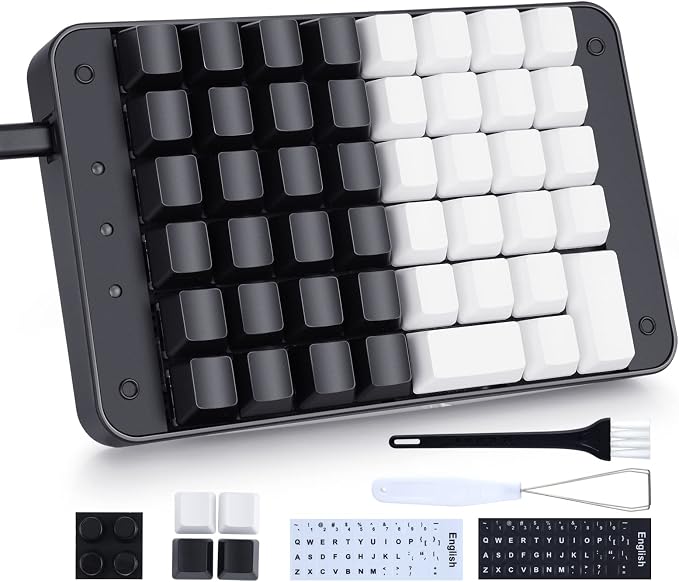
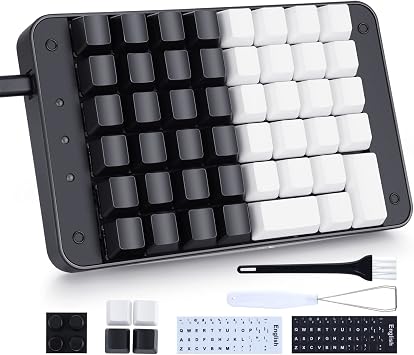
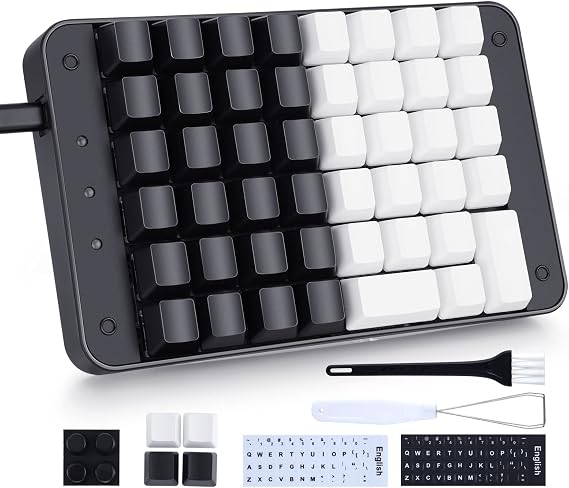
Koolertron One Handed Mechanical Gaming Keyboard with 32 Macro Keys, 46-Key Fully Programmable Mini Keypad, Mini USB Macro Keyboard for PC Gamers
Item #:
68167145
SGD 110
Price Details
Excluding Shipping & Custom charges ( Shipping and custom charges will be calculated on checkout )
*All items will import from US
0 ratings
Write a review
Out of stock
 Imported from USA store
Secured transaction
Ubuy works hard to protect your security and privacy. Our advanced payment security system ensures confidentiality by encrypting your information during transmission using AES (Advanced Encryption Standards) and SSL (Secure Socket Layer) protocols. Your payment details are 100% secure as we do not share your payment details with third party sellers.
Our Top Logistics Partners


Wide Applications 1 For Gaming Lovers 2 For Designers 3 For Office Works 4 For PS Video Editing 5 For Daily Study

Fast
Shipping

Free
Return*

Secure Packaging

100% Original Products

PCI DSS Compliance

ISO 27001 Certified


Note: Step Down Voltage Transformer required for using electronics products of US store (110-120). Recommended power converters Buy Now.


What Stands Out
Fully Programmable
Customize every key to suit your gaming style, enhancing performance and providing an edge over competitors with programmable macros for quick access.
RGB Backlight
Enjoy vibrant and fully customizable RGB lighting that not only enhances aesthetics but also allows for visibility in low-light environments, perfect for gamers.
USB-C Hot-Swappable
Easily swap out switches for a personalized feel without soldering, allowing for quick customization and upgrades, ensuring this keyboard evolves with your gaming needs.
Product Details
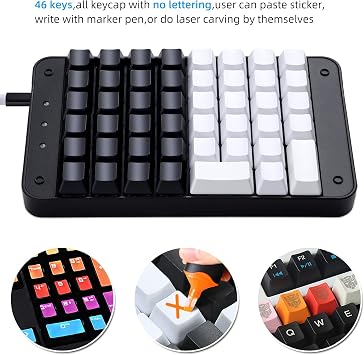
- 🟩【46 Programmable Keys & 32 Macro Keys Based Hardware】Program all 46 keys or create 32 complex macros with the configuration software to take full command of your computer. A macro key can output up to 255 characters. Support macro editing and recording functions. Perfect not only for gamers, but also for so many other types of users including supermarket cashier, designers and video editors
- 🟩【Portable Mini keypad】Portable Mini keypad, effectively save desktop space. You can connect the keypad and a 104-key keyboard with the same computer at the same time, they will not interfere with each other.
- 🟩【 Uniqueness Keycaps】 trigger travel of 2±0.6mm, keystroke force of 45±15cN, plus full anti-ghosting ensures great feel and accuracy. Free 4 replaceable keycaps without printing.
- 🟩【Windows Shortcut Keys】Supports 21 multimedia keys defined by Windows, and supports the combination shortcut keys of keyboard keys + mouse keys, simulating manual typing on the keyboard, and a single key can output 1~252 characters
- 🟩【Built-in MCU】After keyboard keys be set up, it will be automatically stored in keyboard's MCU, and no need reset the keyboard even replace the computer
| Compatible Devices | PC |
| Connectivity Technology | Mini USB, USB |
| Additional Features | Backlit |
| Power Source | Corded Electric |
| Switch Type | Linear |
| Keyboard Layout | QWERTY |
| Hand Orientation | Ambidextrous |
| Button Quantity | 104 |
| Minimum Required Operating System Version | Windows 7 |
| Compatible Operating System Family | Windows |
| Number of Keys | 46 |
| Number of Sections | 46 |
| Color | Red |
| Style Name | 46 Keyboard |
| Theme | Gaming |
| Brand | Koolertron |
| Keyboard Description | Mechanical |
| Antenna Location | Gaming |
| Built-In Media | USB Cable |
| Model Number | AE-SMKD03-BQ |
| Model Name | 46-Key Professional Single-Handed Keyboard |
| Unit Count | 1.0 Count |
| Manufacturer | Koolertron |
| Enclosure Material | Acrylonitrile Butadiene Styrene |
| Recommended Uses For Product | Gaming |
| Special Feature | Backlit |
| Style | 46 Keyboard |
| Material | Acrylonitrile Butadiene Styrene |
| Included Components | USB Cable |
| Item Weight | 1.5 lbs (680 grams) |
What's in the box
USB Cable
Who Should Buy?

-
Compact Enthusiasts
Ideal for users who value desk space and prefer a minimalistic keyboard without sacrificing functionality.
-
Gaming Professionals
Perfect for gamers seeking a responsive, programmable keyboard that enhances their gaming experience with customizable keys.
-
Customization Lovers
Great for users who enjoy personalizing their devices with programmable keys and RGB lighting effects.

-
Writers and Coders
Less suitable for extensive typing tasks as the compact layout may hinder comfort and speed for long use.
-
Traditional Users
Not ideal for individuals accustomed to full-sized keyboards, as the lack of keys might disrupt their workflow.
-
Budget-Conscious Buyers
May not be the best choice for users looking for affordable keyboards, given its premium features and specifications.
Product Description
Have any Query? Chat with us
Customer Questions & Answers
-
Question:
What are the main features of the Koolertron One Handed Mechanical Gaming Keyboard?
Answer: The Koolertron One Handed Mechanical Gaming Keyboard boasts several standout features. It includes 32 customizable macro keys that allow for personalized shortcuts tailored to individual gaming styles or workflows. Additionally, the keyboard is equipped with OEM Gateron Red switches, which provide a smooth keystroke and an excellent response time, ideal for gamers seeking precision. The compact 46-key layout optimizes your gaming area without sacrificing functionality, making it perfect for tight spaces. This keyboard is also compatible with various operating systems, enhancing its versatility. -
Question:
What makes the Gateron Red switches a good choice for gaming?
Answer: Gateron Red switches are favored by gamers due to their linear feel and low actuation force, which allows for rapid input without tactile bumps. This responsiveness is particularly beneficial during fast-paced games, where every millisecond counts. The smooth actuation minimizes finger fatigue, making it comfortable for extended play sessions. Gamers often appreciate these switches for their quiet operation, allowing for an undisturbed gaming environment, ideal for late-night play or shared spaces. -
Question:
How do I program the macro keys on this keyboard?
Answer: Programming the macro keys on the Koolertron keyboard is a straightforward process. Simply install the dedicated software on your PC, where you can record complex sequences and assign them to any of the 32 macro keys. The software provides an intuitive interface, enabling users to create custom profiles for different games or applications. This feature is particularly useful for gamers who need quick access to common actions, leading to improved gameplay efficiency in competitive environments. -
Question:
Is the Koolertron One Handed Mechanical Keyboard suitable for typing on?
Answer: While the Koolertron is primarily designed for gaming, it can certainly be used for typing. The Gateron Red switches provide a smooth typing experience, making it suitable for light office work or casual message writing. However, its one-handed design may not be optimal for extensive typing tasks, as it lacks a full key layout. It's best used in scenarios where quick inputs and macros enhance productivity, such as coding sessions or gaming strategy planning. -
Question:
What devices is the Koolertron keyboard compatible with?
Answer: The Koolertron One Handed Mechanical Gaming Keyboard is compatible with various devices, including PCs and laptops running on Windows and Mac OS. Its plug-and-play Mini USB interface ensures a hassle-free connection with minimal setup required. This cross-compatibility is ideal for users who switch between different systems for gaming or work, making it a versatile accessory for any user’s setup. -
Question:
Can I use this keyboard for console gaming?
Answer: While the Koolertron keyboard is tailored for PC gaming, it can also be used for console gaming with specific setups. Depending on the console, you may require an adapter to ensure the keyboard is recognized. Many gamers use it with consoles like the PS4 or Xbox for enhanced control in certain games, especially first-person shooters. The macro keys can offer an advantage in gameplay as they allow for custom commands or quick actions. -
Question:
What are the dimensions of the Koolertron One Handed Keyboard?
Answer: The compact dimensions of the Koolertron One Handed Mechanical Gaming Keyboard make it an excellent choice for gamers with limited desk space. While specific measurements aren't stated, it typically falls within mini keyboard standards, allowing for efficient use of your gaming area. This compact design is advantageous for users who prefer portability, making it easy to carry to gaming events or LAN parties. -
Question:
How does the keyboard enhance my gaming experience?
Answer: The Koolertron One Handed Mechanical Gaming Keyboard enhances gaming experiences by providing customizable controls through its 32 macro keys, allowing you to create quick commands for various games. The responsive Gateron Red switches provide fast and accurate feedback, crucial for competitive play. Additionally, its ergonomic shape supports prolonged gaming sessions by minimizing wrist strain, making it ideal for dedicated gamers who appreciate both comfort and performance. -
Question:
Where can I buy the Koolertron One Handed Mechanical Gaming Keyboard in Singapore?
Answer: You can purchase the Koolertron One Handed Mechanical Gaming Keyboard from Ubuy. Ubuy offers a reliable platform where you can find this keyboard, ensuring an easy shopping experience with various payment options. Their user-friendly interface allows you to navigate through product specifications and customer reviews, helping you make an informed decision. -
Question:
Is the keyboard customizable for different games?
Answer: Yes, the Koolertron One Handed Mechanical Gaming Keyboard is fully customizable, allowing users to program the 32 macro keys for different games. This means you can create multiple profiles tailored specifically to each game, enabling you to switch seamlessly between different control schemes. This feature is beneficial for gamers who play a variety of genres, from first-person shooters to strategy games, as it optimizes gameplay and enhances overall performance.
Koolertron Keyboards AE-SMKD03-BQ Editorial Review


The Koolertron Single-Handed Programmable Mechanical Keyboard offers customization and convenience for gamers, designers, and editors. With 48 programmable keys, users can assign commands and macros to streamline their workflow. The keyboard is compatible with Windows, Apple computers, and Linux. However, customer reception of this product has been mixed. Some users found the programming instructions to be poorly written and confusing, resulting in difficulty setting up the keyboard. The device also acted as the main keyboard instead of functioning as additional buttons, disappointing some users who had intended to use it for specific program events. The configuration software has received criticism for its unreliability, with reports of Constant disconnections and failure to save programmed macros. Some users also noted that the onscreen keyboard does not have the full range of standard QWERTY symbols, limiting customization options. The limited number of programmable macros (only 8) was another drawback mentioned by customers. Some users found this insufficient for their needs and ultimately returned the product, opting for alternative options like the Stream Deck XL. Despite the challenges with setup and customization, a few users did find value in the keyboard for specific tasks. One user utilized it for controlling characters in a gaming environment, while another found it useful for shortcuts in a trading platform. In conclusion, the Koolertron Single-Handed Programmable Mechanical Keyboard offers potential for customization but falls short in terms of user-friendly programming and reliability. Alternative options like the Stream Deck XL may be better suited for those seeking a more seamless and comprehensive experience.
Customer Reviews & Ratings
14 customers ratings
-
5 Star
27%
-
4 Star
28%
-
3 Star
9%
-
2 Star
15%
-
1 Star
21%
Review this product
Share your thoughts with other customers
Pros
- 48 programmable keys
- Compatibility with Windows, Apple computers, and Linux
- Useful for specific tasks, such as gaming or trading platforms
Cons
- Poorly written and confusing programming instructions
Product Price History
Important information
- Limitations : For products shipped internationally, please note that any manufacturer warranty may not be valid; manufacturer service options may not be available; product manuals, instructions, and safety warnings may not be in destination country languages; the products (and accompanying materials) may not be designed in accordance with destination country standards, specifications, and labeling requirements; and the products may not conform to destination country voltage and other electrical standards (requiring use of an adapter or converter if appropriate). The recipient is responsible for assuring that the product can be lawfully imported to the destination country. When ordering from Ubuy or its affiliates, the recipient is the importer of record and must comply with all laws and regulations of the destination country.
- Not all the products listed on Ubuy are for sale, as Ubuy is a global search engine. Products are subject to export/trade regulations.
SGD 110
Currently unavailable.
We don't know when or if this item will be back in stock.
This item is not restrict in my country.(Please click on above link if this item is not restrict in your country, So our team will review and allow.)
Secured transaction
Ubuy works hard to protect your security and privacy. Our advanced payment security system ensures confidentiality by encrypting your information during transmission using AES (Advanced Encryption Standards) and SSL (Secure Socket Layer) protocols. Your payment details are 100% secure as we do not share your payment details with third party sellers.
Our Top Logistics Partners
Fastest cross-border delivery
Features & Benefits
- Wide range of applications
- Great gift for various fields
- Programmable keys for easy control
- Customizable key functions
- 32 advanced macro functions
- Supports Windows shortcut keys