- Home Page /
- Electronics /
- Computer Accessories /
- Computer Components /
- Computer Internal Components /
- I/O Port Cards /
- FireWire Port Cards /
- axGear PCIE PCI-E FIREWIRE IEEE 1394 3 Port F...
0 ratings

Item #:
26599034
axGear PCIE PCI-E FIREWIRE IEEE 1394 3 Port FIRE Wire Controller Card for Desktop PC
Item #:
26599034
SGD 43
Price Details
Excluding Shipping & Custom charges ( Shipping and custom charges will be calculated on checkout )
*All items will import from US
0 ratings
Write a review
In stock
 Imported from USA store
QTY:
Order now and get it around Tuesday, July 07
Secured transaction
Ubuy works hard to protect your security and privacy. Our advanced payment security system ensures confidentiality by encrypting your information during transmission using AES (Advanced Encryption Standards) and SSL (Secure Socket Layer) protocols. Your payment details are 100% secure as we do not share your payment details with third party sellers.
Our Top Logistics Partners


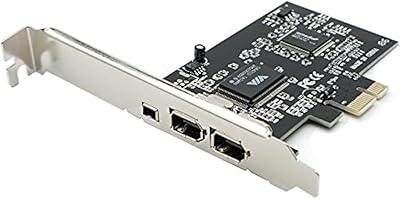
Add three external and one internal 6-pin FireWire ports to support scads of FireWire audio/video devices!

Fast
Shipping

Free
Return*

Secure Packaging

100% Original Products

PCI DSS Compliance

ISO 27001 Certified


Note: Step Down Voltage Transformer required for using electronics products of US store (110-120). Recommended power converters Buy Now.


What Stands Out
Triple Port Design
Equipped with three FireWire ports, this controller card enables simultaneous connection of multiple FireWire devices, enhancing workflow and productivity for professionals in multimedia and data-heavy industries.
Wide Compatibility
Designed for desktop PCs, the axGear FireWire card supports various operating systems, ensuring easy integration with both legacy and modern systems, making it ideal for users needing versatile connectivity.
High-Speed Transfer
With IEEE 1394 standards, this controller card provides high-speed data transfer rates, effectively reducing delays in file transfers and ensuring reliable performance for video editing and other demanding applications.
Product Details
| Item Weight | 0.5 lbs (230 grams) |
Who Should Buy?

-
Video Production
Ideal for video editors needing high-speed connections to cameras and external drives for efficient data transfer.
-
Audio Engineering
Perfect for sound engineers who require reliable connections for audio interfaces and recording equipment.
-
Legacy Device Support
Suitable for users needing to connect older peripherals that rely on FireWire technology for functionality.

-
Gaming
Not suitable for gamers as it lacks USB 3.0 or other popular connection options needed for modern gaming devices.
-
General Use PCs
Not ideal for users who don’t require FireWire connectivity, as it offers limited benefits for standard desktop use.
-
Budget Systems
May not be cost-effective for users who only require basic connectivity without the need for FireWire ports.
Product Description
axGear PCIE PCI-E FIREWIRE IEEE 1394 3 Port FIRE Wire Controller Card for Desktop PC
Have any Query? Chat with us
Customer Questions & Answers
-
Question:
What is the axGear PCI-E FireWire Controller Card used for?
Answer: The axGear PCI-E FireWire Controller Card allows you to add FireWire connectivity to your desktop PC. This is particularly useful for connecting devices such as external hard drives, camcorders, or audio interfaces that rely on FireWire technology. With its three port configuration, you can easily connect multiple devices simultaneously, making it a great addition for content creators or professionals working with high-bandwidth peripherals. -
Question:
Is the axGear FireWire Controller Card compatible with all desktop PCs?
Answer: Yes, the axGear FireWire Controller Card is designed to be compatible with most desktop PCs that have an available PCI-E slot. It supports a range of operating systems, ensuring that it can be integrated into various setups. However, it’s wise to check your system specifications and ensure that you meet the card's requirements for optimal performance, particularly if you plan to connect multiple devices. -
Question:
How does the installation process of the FireWire Controller Card work?
Answer: Installing the axGear FireWire Controller Card is a straightforward process. You simply need to power down your desktop PC, open the case, and insert the card into an available PCI-E slot. After securing it, you will boot up the system where the OS should automatically detect the new hardware. Detailed installation instructions are often included and can help streamline the process, making it suitable even for users with minimal tech experience. -
Question:
Can I connect multiple devices to the axGear FireWire Controller Card?
Answer: Absolutely! The axGear FireWire Controller Card features three FireWire ports, allowing simultaneous connection of multiple devices. This is particularly beneficial for professionals who utilize several FireWire peripherals, like video capture devices or audio interfaces, in their workflow. With this card, you can enhance your setup without needing to constantly plug and unplug devices. -
Question:
What are the data transfer speeds of the axGear FireWire Controller Card?
Answer: The axGear FireWire Controller Card supports high-speed data transfer rates of up to 400 Mbps, depending on the FireWire standard of the connected devices. This makes it an excellent choice for transferring large files or streaming audio and video in real-time. Whether you're editing video footage or backing up large datasets, you can expect reliable and swift data handling with this card. -
Question:
Does the card require any additional power supply?
Answer: No, the axGear FireWire Controller Card does not require an external power supply. It draws the necessary power directly from the PCI-E slot in your desktop PC. This simplifies installation and makes it a hassle-free solution for adding FireWire connectivity to your system. Most users find this design convenient as it keeps the internal setup clean and organized. -
Question:
What types of devices can I connect using the axGear FireWire Controller Card?
Answer: You can connect a wide variety of devices using the axGear FireWire Controller Card, including external storage drives, video cameras, and professional audio interfaces. These connections are especially common in digital media production environments. By enhancing your setup with this controller card, you can streamline your workflow and interface with high-performance peripherals effortlessly. -
Question:
Is driver installation required for the axGear FireWire Controller Card?
Answer: Yes, some operating systems may require specific drivers for optimal performance of the axGear FireWire Controller Card. However, most modern operating systems are capable of detecting and installing necessary drivers automatically. If needed, the manufacturer typically provides support documentation to help you through the process, ensuring you can set up the card and start using it quickly. -
Question:
Where can I buy the axGear PCIE PCI-E FireWire Controller Card for Desktop PC in Singapore?
Answer: You can purchase the axGear PCIE PCI-E FireWire Controller Card for Desktop PC from Ubuy. They offer a variety of electronics including this FireWire controller card, ensuring that you can find it with ease online. Ubuy provides a reliable platform for shopping, with international availability and various shipping options to fit your needs.
axGear FireWire Port Cards Editorial Review
No editorial reviews found
Customer Reviews & Ratings
1 customers ratings
-
5 Star
0%
-
4 Star
100%
-
3 Star
0%
-
2 Star
0%
-
1 Star
0%
Review this product
Share your thoughts with other customers
Product Price History
Important information
- Limitations : For products shipped internationally, please note that any manufacturer warranty may not be valid; manufacturer service options may not be available; product manuals, instructions, and safety warnings may not be in destination country languages; the products (and accompanying materials) may not be designed in accordance with destination country standards, specifications, and labeling requirements; and the products may not conform to destination country voltage and other electrical standards (requiring use of an adapter or converter if appropriate). The recipient is responsible for assuring that the product can be lawfully imported to the destination country. When ordering from Ubuy or its affiliates, the recipient is the importer of record and must comply with all laws and regulations of the destination country.
- Not all the products listed on Ubuy are for sale, as Ubuy is a global search engine. Products are subject to export/trade regulations.
SGD 43
Order now and get it around Tuesday, July 07
This item is not restrict in my country.(Please click on above link if this item is not restrict in your country, So our team will review and allow.)
QTY:
Secured transaction
Ubuy works hard to protect your security and privacy. Our advanced payment security system ensures confidentiality by encrypting your information during transmission using AES (Advanced Encryption Standards) and SSL (Secure Socket Layer) protocols. Your payment details are 100% secure as we do not share your payment details with third party sellers.
Our Top Logistics Partners
Fastest cross-border delivery
Features & Benefits
- Compliant with PCI Express Base Specification 1.0a and IEEE 1394-1995, 1394a-2000, and OHCI 1.1 standards
- Installs in any available PCI Express slot
- Supports data transfer rates up to 400Mbps
- Three external and one internal 6-pin FireWire (1394a) ports
- Compatible with various Windows operating systems