- Home Page /
- Industrial Supplies /
- Industrial Electrical /
- Optoelectronic Products /
- Optoelectronic Displays /
- LCD Touch Panels /
- Touch Screen HMI for Process Analytics, Indus...
0 ratings






Item #:
89215789
Touch Screen HMI for Process Analytics, Industrial Controls and Industrial Software Model: HMI KTP400
Item #:
89215789
SGD 604
Price Details
Excluding Shipping & Custom charges ( Shipping and custom charges will be calculated on checkout )
*All items will import from US
0 ratings
Write a review
In stock
 Imported from USA store
QTY:
Order now and get it around Monday, July 06
Secured transaction
Ubuy works hard to protect your security and privacy. Our advanced payment security system ensures confidentiality by encrypting your information during transmission using AES (Advanced Encryption Standards) and SSL (Secure Socket Layer) protocols. Your payment details are 100% secure as we do not share your payment details with third party sellers.
Our Top Logistics Partners


The ideal entry-level range for simple HMI applications with high-resolution, energy-efficient displays and intuitive operation.

Fast
Shipping

Free
Return*

Secure Packaging

100% Original Products

PCI DSS Compliance

ISO 27001 Certified


Note: Step Down Voltage Transformer required for using electronics products of US store (110-120). Recommended power converters Buy Now.


What Stands Out
Intuitive Interface
The KTP400 features a user-friendly touch screen that simplifies navigation and enhances user experience, allowing operators to access critical process data with ease and efficiency.
Robust Connectivity
Equipped with multiple communication protocols, the KTP400 ensures seamless integration with various industrial devices, enhancing interoperability and streamlining data transfer across systems.
Versatile Applications
Designed for diverse industrial environments, the KTP400 effectively supports process analytics and control, empowering users with real-time insights to optimize operations and improve productivity.
Product Details
- Features: The ideal entry-level range for simple HMI applications | Engineered in the TIA Portal | Flexible scalability within the HMI range | High-resolution, dimmable wide-screen displays with 64.000 colors
- Touch/key functionality for intuitive operation | Interface for connection with various PLCs | Versions for PROFIBUS or PROFINET | Archiving via USB stick
- Configuration software: WinCC Basic (TIA Portal) V13 or higher | Messages: 1000 | Message classes: 32 | Process screens: 100 | Vector graphics: yes | Bar graphics: yes
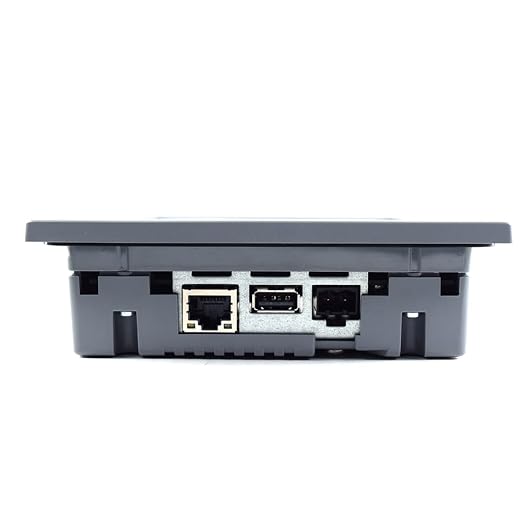
- Curve diagrams: f(t) | Recipes: 50 | Archiving: yes | Resolution: 480 x 272 px | Control elements: Touch screen / 4 Function keys | Memory: 10 MB | Interface: 1 x RJ 45 Ethernet for PROFINET / 1 x USB host | Degree of protection: IP 65, NEMA 4x (front if mounted) / IP 20 rear | Installation cutout: 123 x 99 mm | Device depth: 43 mm
- Supply Scope: 1 unit of Siemens KTP400 SIMATIC HMI Basic Touch Panel, Instruction Manual | Applications: Automation systems, Distributed Control Systems, Industrial Communication, Industrial controls, Identification and Locating, Process Analytics, Industry software
- human machine interface | industrial interface | simens hmi | siemens process display | siemens process indicator | siemens plc connector | siemens plc interface | process controll interface
| Country of Origin | This item will be imported from US |
Product Technical Details
| Item Weight | 11.3 ounces |
| Manufacturer | siemens |
Who Should Buy?

-
Manufacturing Plants
Ideal for automation and process control in manufacturing settings, providing real-time analytics and user-friendly monitoring.
-
Industrial Engineers
Great for industrial engineers who require an intuitive interface for programming and troubleshooting industrial machines.
-
Process Operators
Beneficial for process operators needing clear displays for monitoring and controlling industrial processes effectively.

-
Home Users
Not suitable for home automation projects due to complexity and industrial focus, lacking consumer-friendly features.
-
Small Businesses
May be excessive for small businesses lacking the infrastructure or scale to utilize an industrial-grade HMI effectively.
-
Non-Technical Staff
Can be overwhelming for non-technical staff as it requires knowledge of industrial processes and software for full utilization.
Product Description
Have any Query? Chat with us
Customer Questions & Answers
-
Question:
What are the main features of the Touch Screen HMI KTP400?
Answer: The Touch Screen HMI KTP400 offers an intuitive 4.3-inch color display, providing clear visualization of processes and parameters. It includes built-in interfaces for fast communication with PLCs, along with support for various protocols like Ethernet and RS232. The software also allows for flexible graphics creation, enhancing user experience. It's ideal for factory automation and monitoring equipment status in real-time, making it suitable for applications in process control, machine operation, and data visualization. -
Question:
How can I integrate the HMI KTP400 into my existing system?
Answer: Integrating the HMI KTP400 into your existing system involves connecting it to your PLC or other control devices using the appropriate communication protocols. The HMI comes with a comprehensive manual that guides users through the wiring and configuration process. Many professionals use the KTP400 to monitor production lines or manage equipment conditions by visualizing data through custom interfaces, enabling quick decision-making and enhanced operational efficiency. -
Question:
Is the HMI KTP400 suitable for harsh industrial environments?
Answer: Yes, the HMI KTP400 is specifically designed for industrial applications and is built to withstand harsh environments. Its robust casing and IP65 rating ensure protection against dust and water ingress, making it effective in environments with moisture or contaminants. This durability is essential for industries such as manufacturing, where equipment operates under demanding conditions, ensuring your monitoring and control needs are met reliably. -
Question:
What software is compatible with the HMI KTP400?
Answer: The HMI KTP400 is compatible with the Siemens TIA Portal and WinCC software. These software solutions provide users with powerful tools for designing and managing graphical user interfaces, programming logic, and establishing communication with various devices. Leveraging these platforms allows users to create tailored visualizations that align with their specific operational requirements, enhancing usability and effectiveness in process management. -
Question:
What type of applications is the KTP400 used for?
Answer: The KTP400 is widely used in applications such as process monitoring, machine control, and data collection in various industrial sectors. It's ideal for tasks like overseeing production processes, managing robotics, or tracking inventory levels. Users often find it beneficial in automating control systems, improving productivity, and ensuring that operators can easily access crucial information, thus optimizing overall operation effectiveness. -
Question:
Can I customize the interface of the KTP400?
Answer: Yes, the HMI KTP400 allows for significant customization of its interface. Users can utilize the included software to design unique graphical layouts, tailor functional buttons, and choose color schemes that fit their operational workflows. This flexibility enables users to create an effective interface that delivers essential data at a glance, enhancing operator interaction and facilitating smoother operational processes in any production setting. -
Question:
Does the KTP400 support remote monitoring?
Answer: The KTP400 supports remote monitoring capabilities, enabling users to access real-time data from various devices via Ethernet connections. This feature is essential for organizations that require constant oversight of machine performance or process parameters from remote locations. For example, engineers can troubleshoot issues from their desks or monitor system performance across multiple facilities, leading to faster response times and improved maintenance strategies. -
Question:
What precautions should I take when installing the KTP400?
Answer: When installing the KTP400, ensure that the unit is mounted in a location that avoids exposure to extreme temperatures, moisture, or direct sunlight. Proper grounding of the device is crucial to prevent electrical interference, and following the installation manual closely will help avoid common mistakes. Users often create a controlled environment to operate these devices effectively, which helps maximize their reliability and longevity. -
Question:
What types of connectivity does the HMI KTP400 offer?
Answer: The HMI KTP400 offers various connectivity options including Ethernet TCP/IP, RS232, and USB interfaces. This allows for seamless communication with different types of controllers and devices. Such connectivity options enable users to integrate the HMI effortlessly into existing automation systems, facilitating data exchange for operational analytics and enabling robust control capabilities, ensuring interoperability in various applications. -
Question:
Where can I buy the Touch Screen HMI KTP400 in Singapore?
Answer: You can purchase the Touch Screen HMI for Process Analytics, Industrial Controls and Industrial Software Model: HMI KTP400 from Ubuy in Singapore. Ubuy offers a variety of models and features, making it a reliable platform for acquiring industrial automation products. Their services also ensure that you have access to a wide selection of related components, enhancing your overall purchasing experience.
Ace Instruments LCD Touch Panels Editorial Review
No editorial reviews found
Customer Reviews & Ratings
1 customers ratings
-
5 Star
100%
-
4 Star
0%
-
3 Star
0%
-
2 Star
0%
-
1 Star
0%
Review this product
Share your thoughts with other customers
Product Price History
Important information
- Limitations : For products shipped internationally, please note that any manufacturer warranty may not be valid; manufacturer service options may not be available; product manuals, instructions, and safety warnings may not be in destination country languages; the products (and accompanying materials) may not be designed in accordance with destination country standards, specifications, and labeling requirements; and the products may not conform to destination country voltage and other electrical standards (requiring use of an adapter or converter if appropriate). The recipient is responsible for assuring that the product can be lawfully imported to the destination country. When ordering from Ubuy or its affiliates, the recipient is the importer of record and must comply with all laws and regulations of the destination country.
- Not all the products listed on Ubuy are for sale, as Ubuy is a global search engine. Products are subject to export/trade regulations.
SGD 604
Order now and get it around Monday, July 06
This item is not restrict in my country.(Please click on above link if this item is not restrict in your country, So our team will review and allow.)
QTY:
Secured transaction
Ubuy works hard to protect your security and privacy. Our advanced payment security system ensures confidentiality by encrypting your information during transmission using AES (Advanced Encryption Standards) and SSL (Secure Socket Layer) protocols. Your payment details are 100% secure as we do not share your payment details with third party sellers.
Our Top Logistics Partners
Fastest cross-border delivery
Features & Benefits
- Entry-level series for simple HMI applications.
- High-resolution widescreen displays with 64,000 colors.
- 100% dimmable brightness for energy efficiency.
- Intuitive touch/key functionality for easy operation.
- Compatible with various PLCs and supports USB archiving.
- Engineered in the TIA Portal for flexible scalability.