Build a Music Recording Equipment Setup
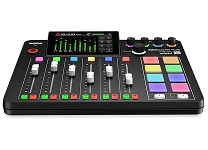
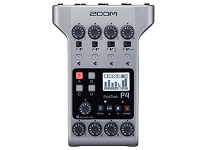
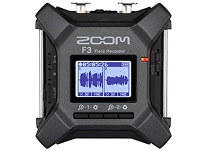
A recording setup can range from a compact interface and microphone for a bedroom studio to a multi-channel system for tracking a band. Common music recording equipment includes microphones, audio interfaces, studio headphones, monitor speakers, microphone stands, cables, and digital audio workstation (DAW) software. Start with the sounds you want to capture: vocals, acoustic instruments, electronic music, podcasts, or full-band performances. A simple vocal or instrument setup often needs one microphone, an interface with a suitable input, headphones, and recording software. More involved projects may call for additional inputs, microphones, stands, and room treatment. Consider how much desk or studio space you have and whether you need portable equipment. Ubuy provides a place to discover international recording products and compare options by type and features.
- Plan equipment around your recording goals
- Check space, portability, and input needs
- Compare complete setups and individual components
Choose Microphones for Vocals and Instruments
Microphone choice affects how a voice or instrument is captured, so consider both pickup pattern and transducer type. Large-diaphragm condenser microphones are commonly used for detailed vocal and acoustic recordings in controlled spaces, while dynamic microphones can suit loud sources and untreated rooms. Small-diaphragm condensers are often selected for instruments where transient detail matters. A cardioid polar pattern focuses on sound from the front and can help reduce room pickup; omnidirectional and figure-eight patterns serve different recording arrangements. Check whether the microphone requires 48-volt phantom power, which many condenser models use, and confirm that the interface provides it. Also compare sensitivity, maximum sound pressure level, connector type, and included accessories. Brands such as Shure, Audio-Technica, and Rode offer options across several recording applications and budgets.
- Match microphone type to the sound source
- Check polar pattern and phantom-power needs
- Compare connectors, sensitivity, and accessories
Compare Audio Interfaces, Preamps, and Connectivity
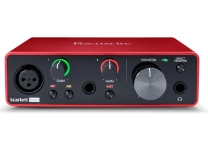
An audio interface connects microphones and instruments to a computer, converting analog signals into digital recordings and sending playback to headphones or speakers. Compare the number and type of inputs with your intended sessions: combo XLR and quarter-inch inputs can accommodate microphones, line-level equipment, and instruments, while multiple preamps support simultaneous recording. Look for phantom power where required, a headphone output with independent level control, and monitor outputs suited to your speakers. USB is common for desktop setups; other connection formats may be relevant to particular computers and workflows, so check device compatibility, drivers, and operating-system support before buying. Preamps provide gain for microphone signals, while direct monitoring can help performers hear themselves with less distracting delay. Focusrite and PreSonus are among the recognized names in interface equipment.
- Match input count to recording sessions
- Verify computer, connector, and driver compatibility
- Consider preamps and direct-monitoring controls
Add Studio Headphones, Monitors, and Essential Accessories
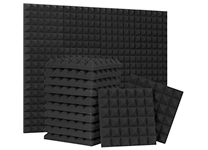
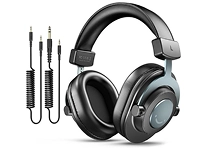
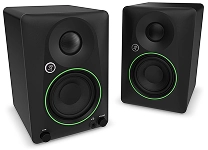
Accurate monitoring helps you judge recordings and mixes. Closed-back studio headphones limit sound leakage into a microphone, making them useful for tracking, while open-back designs can provide a different listening experience for editing or mixing. Studio monitor speakers offer another way to assess balance, but room size, placement, and acoustic reflections affect what you hear. Compare frequency response, connection requirements, and whether powered monitors include built-in amplification. Complete the setup with a stable microphone stand, a pop filter for reducing plosive bursts, a shock mount when appropriate, and correctly sized XLR or instrument cables. A reflection filter or acoustic panels may help manage problematic room sound, though placement and the room itself remain important. Yamaha and KRK are familiar monitor brands; confirm that stands, mounts, and cables fit the specific equipment you choose.
- Use closed-back headphones for tracking
- Consider room acoustics when choosing monitors
- Check accessory fit and cable connections
Select Recording Software and Workflow Tools
A digital audio workstation is the software environment for recording, editing, arranging, and mixing audio. Popular workflow features include multitrack recording, MIDI sequencing, comping, automation, and support for audio plug-ins such as VST or AU instruments and effects. Choose software that works with your computer and interface, supports the projects you plan to make, and feels manageable for your experience level. For voice or instrument recording, set an appropriate input level before tracking to avoid clipping, then organize takes and label tracks for easier editing. A MIDI keyboard controller can add hands-on control for virtual instruments, while a pad controller may suit beat production. Check whether any bundled software is compatible with your setup and whether it meets your needs before treating it as a deciding factor.
- Check DAW compatibility and core features
- Look for plug-in and MIDI support
- Set levels and organize tracks carefully
Select the Right music recording equipment
Choose equipment as a connected system rather than judging each item in isolation. First list your sources, recording environment, computer, and expected number of simultaneous inputs. Then confirm microphone and interface compatibility, phantom-power requirements, available connections, monitoring options, and any software needs. For a first setup, prioritize a dependable microphone, suitable interface, headphones, and essential cables before adding specialized processors or extra controllers. Musicians recording in a shared or reflective room may benefit from a dynamic microphone and thoughtful placement; detailed vocal work in a controlled space may call for a condenser. Consider future expansion, but avoid paying for inputs or features you will not use. Read product specifications closely and verify dimensions and included accessories. Ubuy can help shoppers discover international music recording equipment and compare product details when narrowing their selection.
- Build around sources, space, and workflow
- Verify compatibility before purchasing
- Prioritize essentials before optional upgrades